Rooms
Home Office Design Ideas That Boost Focus
July 12, 2026 · 9 min read
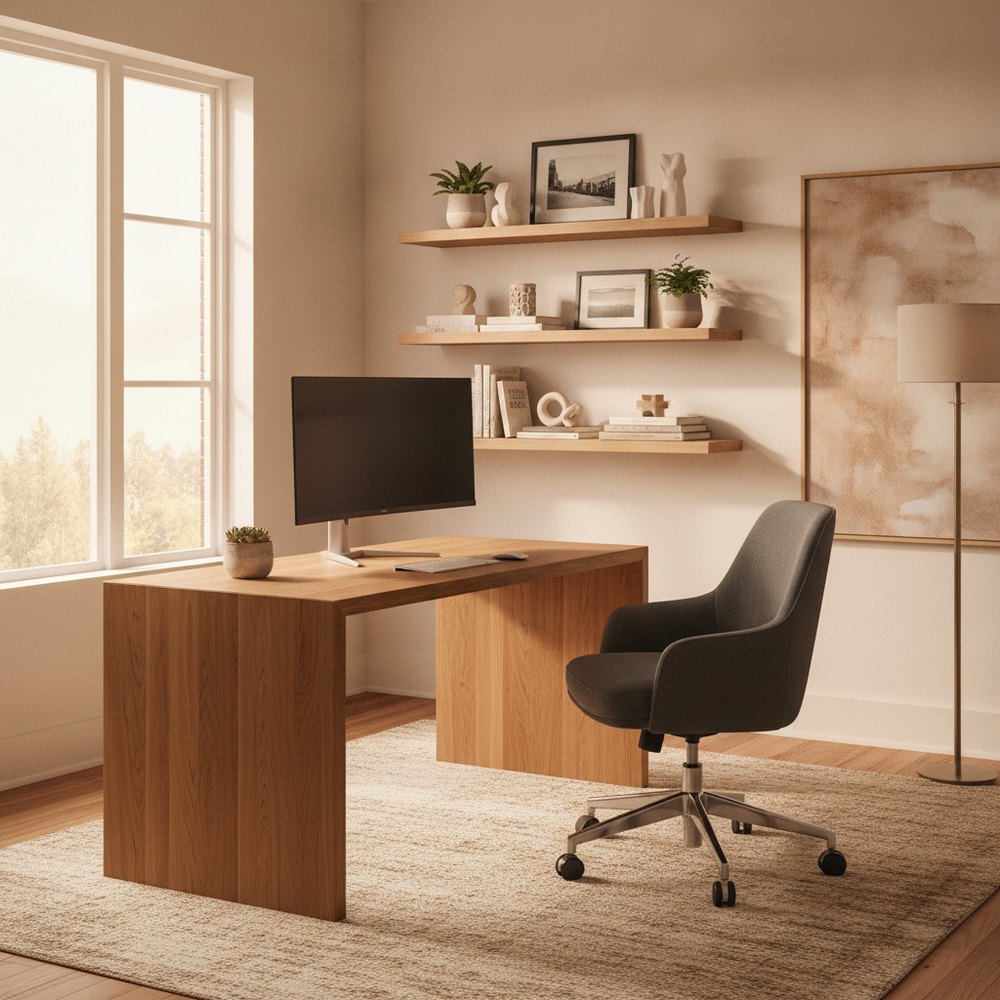
A productive home office comes down to five things: place the desk near daylight but with your back to a wall, sit at an ergonomic height, light the space in layers, arrange a tidy backdrop behind you for video calls, and hide cables and clutter. Even a corner or shared nook can deliver all five.
What makes a home office actually productive?
A productive home office is less about square footage and more about signals. Your brain works best when a space clearly says 'this is where I focus' — a defined zone, comfortable ergonomics, good light and minimal visual noise. When work bleeds into the sofa or the kitchen table, focus and switching-off both suffer, which is why even a small dedicated corner beats a larger but ambiguous space.
The goal is to design for three things at once: comfort for long sessions, focus during them, and a clean professional presence for video calls. The sections below tackle each. None of them require a whole spare room — a well-planned 1.2-metre stretch of wall can outperform a poorly arranged study.
Where should you put the desk?
Desk placement sets the tone for everything else. Wherever possible, position the desk to make the most of natural light — ideally so daylight comes from the side rather than straight ahead (which causes glare on your screen) or directly behind (which throws the screen into shadow and silhouettes your face on calls). A desk beside a window, facing into the room, is often the sweet spot.
There is a well-known psychological principle called the 'commanding position': people concentrate more comfortably with a solid wall behind them and a clear view of the door, rather than with their back exposed to an open room. In a small space, that can be as simple as tucking the desk into a corner so you face outward. If the only option is facing a wall, hang something calm at eye level and place a small mirror to reflect the room behind you.
- Light from the side — avoids screen glare and unflattering backlight on calls.
- Back to a wall, eyes to the room — the commanding position aids focus and ease.
- Claim a corner — an L-shaped or corner desk fits more work surface into less floor.
- Separate from rest zones — keep the desk out of the direct sightline of the bed or sofa.
- Face outward if you can — staring at a blank wall all day drains energy.
How do you set up an ergonomic workstation?
Ergonomics is what lets you work for hours without aches, and it is mostly about height and angles rather than expensive kit. Your eyes should meet the top third of the screen when you look straight ahead, your forearms should rest roughly parallel to the floor while typing, and your feet should sit flat on the floor or a footrest with your knees at about a right angle. Getting these three relationships right prevents most neck, shoulder and wrist strain.
A supportive chair is the one place worth spending, because you are in it all day. If you use a laptop, add a separate keyboard and mouse and raise the screen on a stand — laptops force a choice between a good screen height and a good wrist position, and a stand solves both. Stand up and move at least once an hour; no setup is healthy if you never leave it.
- Screen at eye level — top of the monitor roughly level with your eyes, an arm's length away.
- Forearms parallel to the floor — elbows near 90 degrees while typing.
- Feet flat, knees at 90 degrees — use a footrest if the chair is too tall.
- Invest in the chair — lumbar support and adjustable height matter most.
- Laptop users: raise and separate — a stand plus external keyboard fixes posture instantly.
How should you light a home office?
Lighting affects both comfort and how alert you feel, yet most home offices rely on a single overhead fitting that leaves the desk in shadow. Layer it instead: ambient light for the room, a dedicated task light on the desk, and daylight managed so it helps rather than glares. During focused work, cooler, brighter light (around 4000K) supports alertness; in the evening, warmer light helps you wind down.
Position a task lamp to the side opposite your writing hand so it doesn't cast a shadow across your work, and keep it out of the camera frame. Manage window glare with a light blind you can angle through the day. For the full theory of colour temperature and layering, see best lighting for every room.
- Layer three sources — ambient, task and daylight, never one overhead light alone.
- Cooler light for focus — around 4000K supports concentration during work hours.
- Angle the task lamp — place it opposite your writing hand to avoid shadows.
- Control glare — an adjustable blind stops daylight washing out your screen.
- Keep lamps out of frame — position lighting so it flatters you on calls.
How do you create a good video-call backdrop?
On video calls, what's behind you is part of how you're perceived, and a chaotic or empty background is distracting either way. The most flattering backdrop has a little depth and a little interest without clutter: a styled shelf, a plant, a piece of art or textured wall a metre or two behind you reads as considered and professional. Avoid sitting with your back directly against a blank wall (flat and stark) or in front of a bright window (which silhouettes you).
Keep the framed area genuinely tidy, because it is the only part of the room your colleagues judge. Soft, even light on your face — ideally daylight from the front or side — beats any virtual background. A single well-placed plant and one piece of art will do more for your on-screen presence than any gadget.
- Add depth behind you — a shelf or plant a metre or two back reads as professional.
- Avoid the flat wall and the bright window — one is stark, the other silhouettes you.
- Style just the framed area — only what the camera sees needs to be tidy.
- Light your face, not the wall — front or side daylight is the most flattering.
- Keep it simple — one plant, one artwork, a calm background.
How do you fit an office into a small or shared space?
You rarely need a whole room. A shallow desk against a wall, a fold-down surface, a repurposed alcove or a corner of the living room can all become a real workspace with a little zoning. The trick is to visually separate 'work' from 'rest' so both feel distinct — a rug, a shelving unit, a change in wall colour or a slim screen is often enough to draw the line.
In a shared space, a closed-storage approach keeps work from taking over the room: choose a desk with a drawer or a cabinet that hides the laptop and paperwork at the end of the day, so the office disappears and the room reads as a home again. Going vertical — a shelf above the desk, a pegboard, wall-mounted trays — keeps the small footprint clear. For zoning an entire small home around a work area, our studio apartment layout ideas go further.
- Zone visually — a rug, screen or accent wall separates work from rest.
- Use awkward spaces — alcoves, landings and under-stairs nooks make great compact offices.
- Hide it at day's end — closed storage lets a shared room switch back to home mode.
- Build upward — shelves and pegboards clear the desk without adding floor furniture.
- Fold-away where needed — a drop-down desk reclaims the space entirely when not in use.
How do you tame cables and clutter?
Nothing undermines a calm workspace faster than a tangle of cables. Route them along the back of the desk with clips or a cable tray, gather the excess into a box or sleeve, and put your router, chargers and power strip out of sight. A single tidy cable channel behind the desk transforms how finished the whole setup looks.
For everything else, give each item a home and keep only what you use daily on the desktop. A drawer unit, a couple of trays and a shelf handle the rest. A clear surface at the end of each day is both a productivity habit and a way to keep a small office feeling like a designed space rather than a dumping ground.
- Route and gather cables — clips, a tray and a box hide the tangle.
- Bench the tech — router, power strip and chargers live out of sight.
- A home for everything — trays and a drawer unit keep the desktop clear.
- Daily reset — clearing the surface each evening protects both focus and calm.
How can you preview your home office with AI?
Because a good office is about arrangement more than expense, it is the perfect space to plan visually before you move furniture or buy anything. AI interior design lets you redesign a photo of your actual room — corner, alcove or spare room — while keeping the real layout and windows, so you can test desk placement, colour and storage in minutes.
With Decorly, photograph the space, pick a calm, focused style and generate a few versions: try the desk in the corner, a lighter wall behind you, a shelf backdrop and added storage. Compare them, choose the layout that feels most workable, and use it as your setup plan.
- 1Photograph the nook in daylight — capture the wall, window and available corner.
- 2Upload to [Decorly](/) and pick a focused style — clean and uncluttered works best.
- 3Test placements — desk against the wall, then in the corner, then with a backdrop shelf.
- 4Choose and set up — build the version that reads as calm and workable.
Frequently asked questions
Where is the best place to put a desk in a home office?
Beside a window so daylight comes from the side (avoiding screen glare and backlight), with your back to a wall and a view of the room. In small spaces, tucking an L-shaped desk into a corner delivers this 'commanding position' and maximises the work surface.
How do I set up an ergonomic home office cheaply?
Get the free things right first: screen top at eye level an arm's length away, forearms parallel to the floor, and feet flat with knees at about 90 degrees. If you use a laptop, add a stand plus an external keyboard and mouse. Then spend on a supportive chair — it's the one item worth the money.
What makes a good video-call background at home?
A little depth and interest without clutter — a styled shelf, a plant or artwork a metre or two behind you, with soft daylight on your face. Avoid sitting against a flat blank wall or in front of a bright window, which silhouettes you.
How do I fit a home office into a shared room?
Zone it visually with a rug, screen or accent wall, use an awkward corner or alcove, and choose closed storage so the laptop and paperwork disappear at the end of the day. Going vertical with shelves keeps the small footprint clear.
How should I light a home office?
Layer three sources — ambient, a task lamp and managed daylight — rather than relying on one overhead light. Use cooler light (around 4000K) for focus during the day, angle the task lamp opposite your writing hand, and control window glare with an adjustable blind.